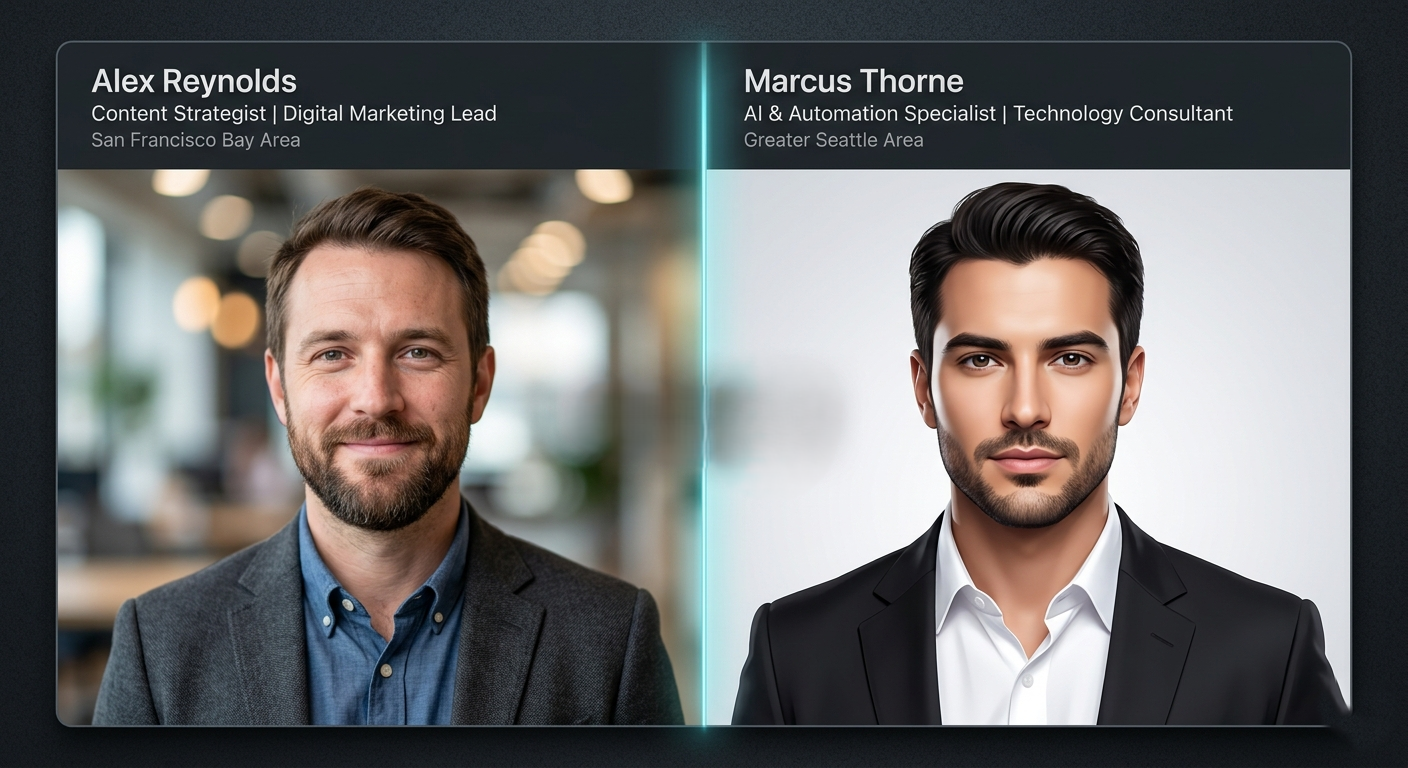
You receive a connection request on LinkedIn. The person looks polished — professional headshot, impressive job title, a dozen mutual connections. But something about the photo feels slightly too clean, slightly too perfect. That instinct is worth listening to. In 2026, fake LinkedIn profile photos powered by AI image generators are no longer the crude, obvious fakes of years past. They are photorealistic, convincing, and being deployed at scale by scammers, fraudsters, and influence operations worldwide. Knowing how to spot a fake LinkedIn profile photo — and how to verify it instantly — has become an essential professional skill.
- AI generated LinkedIn profile photos are now indistinguishable from real headshots to the untrained eye.
- Specific visual tells — in ears, backgrounds, hair, and lighting — remain detectable with careful inspection.
- Reverse image search catches stolen real photos but misses purpose-generated AI faces entirely.
- Tools like WeDetectAI can analyze any LinkedIn profile photo and return a confidence score in seconds.
- Fake LinkedIn profiles cost businesses an estimated $1.1 billion annually through fraud, scams, and data harvesting.
- The safest verification method combines visual inspection, reverse image search, and an AI image detector.
What Is a Fake LinkedIn Profile Photo?
A fake LinkedIn profile photo is any image used to misrepresent a person's identity on the platform — and in 2026, these photos fall into two distinct categories that require different detection strategies.
The first is a stolen photograph — a real image of a real person, scraped from Instagram, stock photo databases, or personal websites and reassigned to a fraudulent account. This type of fake has been around since LinkedIn launched and is detectable via reverse image search tools like Google Lens or TinEye.
The second — and far more dangerous — is an AI generated profile photo: a synthetic headshot that depicts no real person, produced by a generative AI model and uploaded as though it were a genuine photograph. These images cannot be found via reverse image search because they have never appeared anywhere before. They are unique, purpose-generated, and increasingly perfect.
According to research from Stanford Internet Observatory, AI generated faces are now rated as more trustworthy than real human faces in blind studies — a finding that underscores exactly why fake LinkedIn profile photos built on synthetic images are so effective at manipulating professional trust.
The consequences are real. LinkedIn itself reported removing over 80 million fake accounts in the first half of 2023, and security researchers estimate that the proportion of fake profiles using AI generated headshots has grown sharply since then. Whether the goal is romance fraud, corporate espionage, phishing, or fake recruiting, the profile photo is always the first hook.
Image Placeholder
Two-panel infographic on dark background: left panel labeled 'Stolen Real Photo' shows a photo icon with a reverse-image-search magnifying glass icon and a green checkmark indicating it's detectable; right panel labeled 'AI Generated Face' shows a neural-network node diagram with a cyan glow and a red warning icon saying 'No reverse search match exists.' Cyan accent labels, clean flat design.
Further reading: How AI image generators create synthetic faces — helps readers understand the technology behind what they're identifying.
How to Tell If a LinkedIn Photo Is AI Generated: Visual Clues
The fastest zero-tool method is careful visual inspection. Professional headshots have specific characteristics that genuine photographs share and that AI models consistently fail to replicate accurately. Here is what to examine, in order of reliability.
The Face Is Too Perfect — and Too Symmetrical
Human faces are naturally asymmetrical. One eye sits slightly higher. The jawline is stronger on one side. A dimple appears on one cheek but not the other. AI generated faces tend toward an idealized symmetry that no real person possesses — both eyes precisely level, the nose perfectly centered, the chin geometrically balanced.
Beyond symmetry, look at skin quality. Real professional headshots, even retouched ones, retain micro-texture: individual pores, slight unevenness in skin tone, natural shadows beneath cheekbones. AI generated headshots produce skin that appears almost plastic in its smoothness — a hyper-rendered version of human skin that is technically flawless but physically implausible. Pay particular attention to the area around the eyes — AI models frequently generate irises that are unnaturally luminous or perfectly circular, with reflections that do not correspond to any real light source in the scene.
Ears, Hairline, and Accessories
Ears are one of the most reliable tells in AI generated portraits. They are structurally complex — a tangle of cartilage folds, shadows, and curves that AI models frequently approximate rather than render accurately. Look for ears that appear merged into the hair, or that have an internal structure that looks generic rather than individual. Sometimes one ear is rendered correctly while the other is slightly wrong.
The hairline is another high-signal region. AI generated hair tends to look volumetric and individually perfect strand-by-strand, yet the transition zone where hair meets forehead skin lacks the natural wispy irregularity of real hair. It often appears too clean, too defined — like a rendered texture rather than biological growth.
Glasses, earrings, and necklaces deserve close attention in any suspected fake. Accessories require the AI to maintain structural consistency with the face and lighting simultaneously — a challenge that frequently produces frames that clip through ears, earrings that are not quite symmetrical, or necklace clasps that sit at improbable angles.
Background and Lighting Inconsistencies
Corporate headshots are taken in controlled environments — a solid backdrop, a well-lit studio, or a clean office setting. AI generated headshots often produce backgrounds that look plausible at a glance but become incoherent on close inspection. Look for:
- Architectural elements in the background that do not connect or align correctly.
- Bookshelves where the books have no readable titles — just texture.
- Office windows with impossible light sources that conflict with face lighting.
- A subject lit from camera-right while the background implies overhead ambient light.
AI generated headshots produce skin that appears almost plastic in its smoothness — technically flawless but physically implausible.
The Technology Producing Fake LinkedIn Headshots
Understanding what generates these images helps you detect them more reliably. Two distinct AI technologies are responsible for the majority of fake LinkedIn profile photos in circulation.
GAN-Generated Faces
Generative Adversarial Networks (GANs) — specifically face-synthesis models like StyleGAN — were the dominant technology behind fake profile photos from roughly 2019 through 2023. A GAN consists of two neural networks in competition: a generator that creates synthetic faces and a discriminator that attempts to identify fakes. Through millions of training cycles, the generator learns to produce faces that defeat the discriminator — and by extension, that fool human observers.
GAN-generated faces have a characteristic visual signature: a tendency toward centered composition, a specific frequency-domain fingerprint, and subtle color-channel artifacts that detection algorithms can identify even when human eyes cannot. Websites like This Person Does Not Exist demonstrated GAN technology to the public — every refresh produced a new, completely synthetic face of a person who has never existed.
Diffusion Model Headshots
Since 2024, diffusion models— the technology behind Midjourney, DALL·E 3, and Stable Diffusion — have begun producing headshots sophisticated enough to serve as convincing LinkedIn profile photos. Unlike GANs, diffusion models start from random noise and progressively denoise the image guided by a text prompt. Prompting a diffusion model with “professional headshot, corporate portrait, photorealistic, 35mm” produces results that are genuinely difficult to distinguish from real photography. Diffusion model headshots are harder to detect than GAN images — which is why continuously updated tools like WeDetectAI maintain detection accuracy as generation technology evolves.
Why Fake LinkedIn Profile Photos Are a Serious Problem
The harm caused by fake LinkedIn profile photos extends well beyond individual embarrassment at having connected with a fraudulent account. The consequences operate at professional, corporate, and societal levels.
- Recruitment fraud: Fake recruiters using AI generated headshots approach job seekers with offers that require upfront fees, personal information, or banking credentials. The FBI's Internet Crime Complaint Center (IC3) reported a 62% increase in recruitment fraud complaints between 2023 and 2025.
- Corporate espionage: Nation-state actors and corporate competitors build fake professional personas — complete with AI generated headshots and fabricated employment histories — to infiltrate corporate networks, extract proprietary information, and map organizational structures.
- Phishing and social engineering: A convincing fake LinkedIn profile with a professional headshot dramatically increases the success rate of spear-phishing attacks. Employees are far more likely to open a malicious email or attachment from someone who appears to be a real industry contact.
- Romance and investment fraud: The same techniques used in dating app romance scams have migrated to LinkedIn, where the professional context lends an additional layer of credibility. Investment fraud schemes — sometimes called "pig butchering" — frequently begin with a LinkedIn connection from an AI-faced fake.
- Influence operations: State-sponsored information operations use networks of fake LinkedIn profiles to amplify narratives, infiltrate professional communities, and conduct targeted influence campaigns against specific organizations or individuals.
Image Placeholder
2×3 icon grid on dark background: a lock breaking (Corporate Espionage), a fishing hook through a document (Phishing), a money symbol with warning triangle (Investment Fraud), a person silhouette with question mark (Recruitment Fraud), a broken heart with coin (Romance Fraud), a megaphone (Influence Operations). Each icon sits in a rounded card with a one-line label. Cyan accent outlines, flat design.
Try It Free
Upload any LinkedIn profile photo and get an AI detection confidence score in seconds. No account required.
Detect Fake Photos Free at WeDetectAI →Real vs Fake: How LinkedIn Profile Photo Verification Methods Compare
Not all verification strategies are equally effective against every type of fake. Here is a comprehensive comparison of the main approaches:
| Method | Detects Stolen Real Photos | Detects AI Generated Faces | Speed | Technical Skill | Free |
|---|---|---|---|---|---|
| Reverse image search (Google Lens) | Yes — if indexed | No — unique image, no match | Fast | Low | Yes |
| TinEye reverse search | Yes — large index | No | Fast | Low | Yes |
| Manual visual inspection | Partial | Partial (unreliable) | Slow | Medium | Yes |
| EXIF metadata inspection | Partial | Partial (often stripped) | Medium | High | Yes (ExifTool) |
| WeDetectAI confidence score | Yes | Yes — purpose-built | Instant | None | Yes |
| LinkedIn's own detection | Partial | Partial | Automatic | None | Built-in |
Critical gap: Reverse image search — the most commonly recommended verification method — is entirely blind to AI generated faces. Because a synthetic headshot has never appeared anywhere before, no reverse image search engine will find a match. A zero-result search is not proof of authenticity. It is simply proof that the image was not stolen.
Further reading: Understanding WeDetectAI confidence scores — essential reading before interpreting detection results.
Common Myths About Fake LinkedIn Profile Photos
Misinformation about how to identify fake accounts is widespread — and acting on bad advice can leave professionals dangerously exposed. Here are the most persistent myths, corrected.
“If a reverse image search returns no results, the photo is real.”
This is the most dangerous misconception in circulation. Reverse image search finds stolen photographs by matching them against indexed images — it cannot detect an AI generated face that has never been uploaded anywhere before. A zero-result reverse search tells you only that the photo is not a stolen image. It says nothing about whether the photo is AI generated. Many fraudsters now specifically use AI generated headshots precisely because they defeat reverse image search.
“Fake LinkedIn profiles are obvious — bad grammar and stock photos.”
This describes fake profiles from five years ago. Sophisticated fake profiles in 2026 include polished writing (often AI assisted), detailed work histories, endorsements from other fake accounts, and purpose-generated headshots that look indistinguishable from real professional photography. The era of the obvious fake is over.
“LinkedIn's own systems catch fake accounts quickly.”
LinkedIn does invest significantly in fake account detection and removes tens of millions of fake accounts each year. However, platform-level detection operates at scale and with significant false-negative rates. Many sophisticated fake accounts remain active for months or years before removal. Platform trust is not individual verification.
“Only people with no mutual connections are suspicious.”
Sophisticated fake account networks build mutual connection graphs by connecting with each other — creating the appearance of shared professional community. A fake LinkedIn profile with 50 mutual connections is not inherently more trustworthy than one with zero. The mutual connections themselves may be fake.
“AI profile photo detectors are too complicated for non-technical users.”
This was true of early detection research tools. It is not true of WeDetectAI, which requires no technical knowledge — upload the image, read the confidence score, done. The entire process takes under a minute and requires no account.
How to Check a LinkedIn Profile Photo Using WeDetectAI
The most reliable verification workflow combines a quick reverse image search with an AI image detection scan. Here is the complete process, step by step.
Save or Copy the Profile Photo
Right-click the LinkedIn profile photo and select “Save image as” to download it, or right-click and select “Copy image” to copy it to your clipboard. On mobile, press and hold the profile image to save it to your camera roll. LinkedIn serves profile photos at sufficient resolution for accurate detection — you do not need a higher-quality source.
Image Placeholder
Browser mockup showing a LinkedIn profile card with a right-click context menu open over the profile photo. The 'Save image as' option is highlighted with a cyan glow. Dark browser chrome, realistic LinkedIn-style UI layout, clean and minimal.
Run a Reverse Image Search First
Before running a detection scan, perform a quick reverse image search. Drag the saved photo into Google Lens or TinEye and check results.
- If the image appears on another person's social profile, stock photo site, or any other source under a different name — the account is using a stolen real photo. Stop here.
- If the reverse search returns no meaningful results, this does not clear the profile. It means the photo is either genuine or AI generated. Proceed to Step 3.
Upload to WeDetectAI
Navigate to wedetectai.com. No account required. Drag and drop the saved profile photo into the upload zone, or click to browse and select the file. WeDetectAI accepts JPG, PNG, and WEBP formats. The profile photo saved from LinkedIn will be in one of these formats.
Read the Confidence Score
WeDetectAI returns a confidence score from 0–100% within five seconds, indicating the probability that the photo is AI generated.
Image Placeholder
WeDetectAI result screen: left side shows a LinkedIn-style profile photo thumbnail; right side shows a large circular gauge reading '91% AI Generated' in rose-red. Below the gauge: warning note 'This image shows strong indicators of AI generation.' Dark card UI, clean sans-serif typography.
Cross-Reference With Profile Signals
A high WeDetectAI confidence score should prompt you to check the rest of the profile for additional red flags:
- Employment history that lists prestigious companies with no verifiable colleagues.
- Connections disproportionately concentrated in one region or industry.
- Endorsements from accounts that themselves have few connections or recent activity.
- A profile created recently but claiming years of senior experience.
- Messages that create urgency, request personal information, or introduce financial opportunity early in a conversation.
No single signal is conclusive. The combination of a high AI photo detection score and multiple profile red flags is strong grounds for disengaging entirely.
Frequently Asked Questions
How common are AI generated profile photos on LinkedIn?
Studies from cybersecurity researchers at University College London and independent threat intelligence firms estimate that between 5% and 10% of active LinkedIn profiles use some form of synthetic or manipulated profile photo as of 2025. Given LinkedIn's reported user base of over one billion accounts, this suggests tens of millions of fake or AI-enhanced profile photos may be in active circulation at any given time.
Can LinkedIn detect AI generated profile photos automatically?
LinkedIn uses automated systems to detect and remove fake accounts, including some AI image detection capabilities. However, the platform operates at massive scale and with inherent detection limitations — particularly against the newest diffusion-model generated headshots. LinkedIn's detection catches many fakes but is not comprehensive enough to be relied upon as an individual verification method.
Is it possible for a real person to use an AI generated LinkedIn photo?
Yes. Some real professionals use AI generated headshots as a cost alternative to professional photography. This practice is not inherently fraudulent but is potentially misleading on a professional platform where authenticity is implied. A high WeDetectAI confidence score indicates AI generation — it does not automatically indicate fraud. Always consider the full context of the profile before drawing conclusions.
What should I do if I suspect a LinkedIn profile is fake?
First, do not engage with messages that request personal information, financial transfers, or urgency-based actions. Second, verify the photo using WeDetectAI and reverse image search. Third, report the profile to LinkedIn using the 'Report' option on the profile page — select 'Fake profile' as the reason. LinkedIn's trust and safety team reviews reports and removes confirmed fake accounts.
Does WeDetectAI work on images downloaded from LinkedIn?
Yes. WeDetectAI accurately analyzes images saved directly from LinkedIn profiles. LinkedIn does apply light compression to profile photos, but at a level that does not meaningfully impair detection accuracy. For the most accurate result, use the highest-quality version of the profile photo available.
Conclusion
The professional trust that LinkedIn was built on is precisely what makes it such an attractive target for fake profile photo fraud. A polished headshot, a credible work history, and a handful of mutual connections are all it takes to appear legitimate — and in 2026, AI image generators can produce that headshot in seconds with no human face behind it.
Knowing how to tell if a LinkedIn photo is AI generated is no longer optional for anyone who takes professional security seriously. Visual inspection gives you a trained eye. Reverse image search catches stolen photographs. And WeDetectAI closes the critical gap that every other method leaves open — detecting purpose-generated AI faces that have never existed anywhere before.
The next connection request that feels slightly too polished? Run the photo. It takes thirty seconds and it might save you considerably more.
Free · No Signup Required · Instant Results
Not sure if that LinkedIn photo is real?
Upload any profile photo and get a confidence score in under five seconds. Try WeDetectAI free — no account required.
Detect Fake Photos Free at WeDetectAI →